Key Takeaways
Simplicity saves lives:
- Clear, mobile-first flows helped patients request critical supplies and understand their device data with ease.
- Empathy was our north star: Every screen was crafted to support patients dealing with the emotional and physical demands of treatment.
- Design can be a care tool: The app bridged communication gaps between patients and providers, reducing stress and improving outcomes.
What’s Next
There is more to add to support patients and connect them with a community of other patients and caregivers. The app is currently in pilot rollout, with plans for integration into Novocure’s full digital care ecosystem. Early feedback from both patients and clinical staff has been overwhelmingly positive.
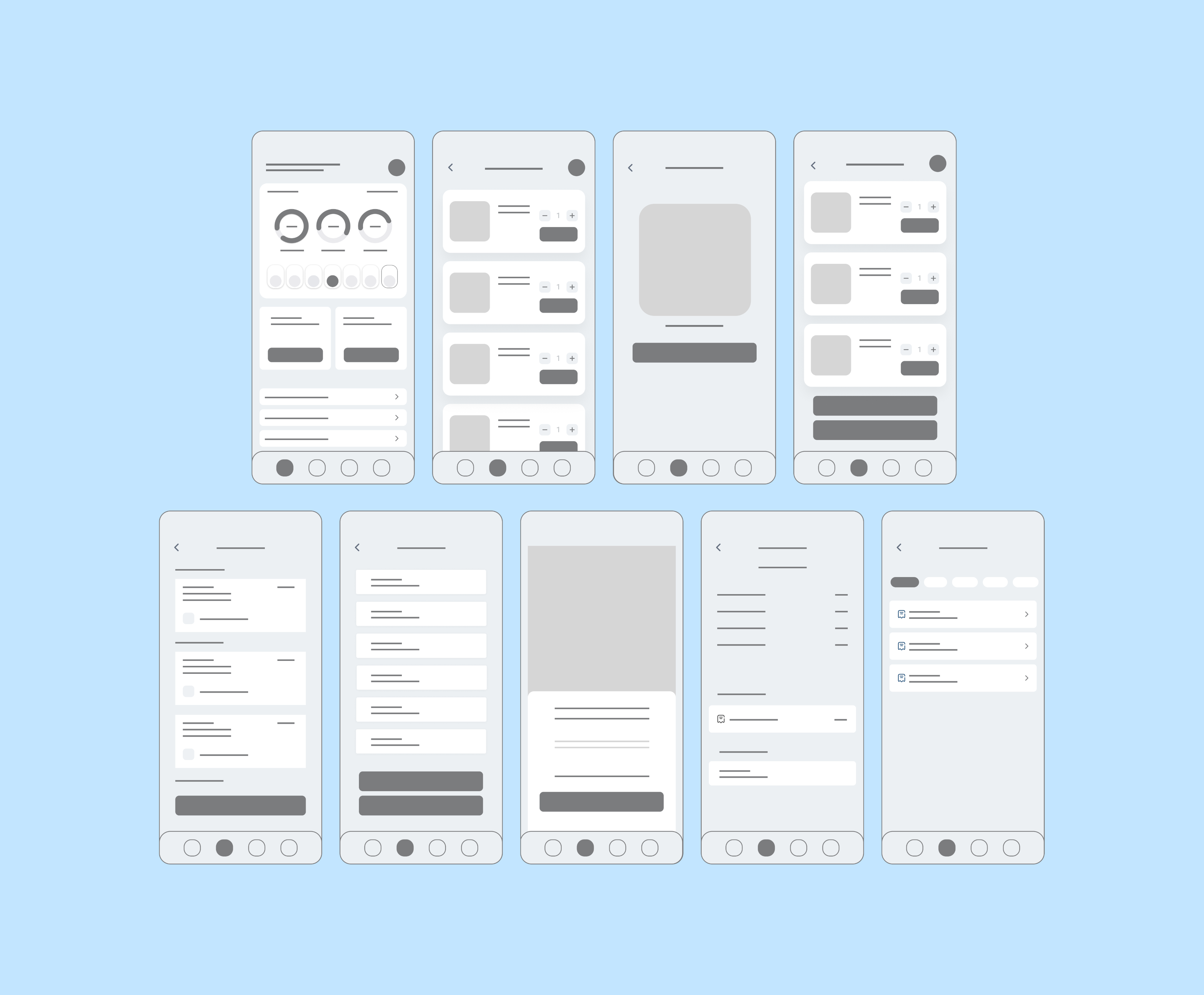
Ordering Supplies Task Flow
One of the main pain points of patients/caregivers is enduring long customer service lines to order essential treatment supplies and wait for long periods of time. Having a smooth process to allow treatment supplies orders through the App is beneficial for the patients/caregivers, and the company/employees saving both parties time and resulting in overall satisfaction and easy continuation of treatment.
Treatment Supply Orders Wireframes
The Results
- Supply requests completed 45% faster during user testing compared to the previous phone-in process
- Device data comprehension improved by 60%, with users confidently identifying key metrics in under 30 seconds
- User satisfaction score increased by 38%, based on usability testing with real Novocure patients and caregivers
- Streamlined the onboarding process of new patients resulting in 10% patient increase.
How We Got There
We broke down complex medical interactions into digestible, patient-friendly flows. Using visual cues like progress bars, simplified iconography, and guided onboarding, patients could quickly understand what needed to be done and how to do it.
User Persona
Sarah -Caregiver - Tech Savvy
Needs: Simplified supply ordering, checking device data.
Pain Points: Managing supplies and treatment for her parents, not sure of treatment progress.
Pain Points: Managing supplies and treatment for her parents, not sure of treatment progress.
John -Patient - Not tech savvy
Needs: Easy-to-understand treatment resources, community support.
Pain Points: Feeling isolated, struggling to keep up with treatment information.
Pain Points: Feeling isolated, struggling to keep up with treatment information.
Emily -Patient - tech savvy
Needs: Efficient supply management, real-time usage data, quick access to resources.
Pain Points: Difficulty in managing supplies and interpreting device data, lack of time for frequent consultations.
Pain Points: Difficulty in managing supplies and interpreting device data, lack of time for frequent consultations.
UX Case Study
Duaa Zahra
Solution
Designed a patient-centered mobile app to simplify supply ordering, visualize real-time device data, provide accessible treatment resources, and create a space for community support
Client
Novocure - Oncology company providing tumor-treating field (TTFields) therapy for patients at home. It is widely recognized for innovative cancer therapy, but lacked a unified digital tool to support patient.
Problem
Patients struggled to manage their treatment independently—facing friction with ordering supplies, tracking device usage, finding trustworthy resources, and feeling isolated without a support system.
Results
- +55% faster access to essential treatment tools (based on prototype task completion time)
- +40% improvement in patient confidence and usability scores (via user testing)
- Consolidated four fragmented touch points into one seamless mobile experience
Design Process
I used a 5-stage Design Thinking model proposed by the Hasso Plattner Institute of Design at Stanford (the "d. school"). The stages of this Design Thinking process are as follows:
Empathize
Define
Ideate
Prototype
Test
User Needs
Easily order and track medical supplies.
Access real-time device usage data.
Find reliable treatment resources.
Connect with a support community.
Challenges
Novocure patients managing treatment at home faced major hurdles—ordering supplies, accessing device data, and getting resources often meant long waits with customer service. Without simple tools to track progress or connect with peers, many felt isolated and overwhelmed, putting adherence and outcomes at risk. Left unresolved, these barriers could undermine the effectiveness of a life-extending cancer therapy, leading to missed treatments, lower quality of life, and poorer results—threatening Novocure’s mission.
Product Users
The Novocure app serves cancer patients (21+) and their caregivers managing treatment at home. Patients need simple ways to order supplies, track device data, access resources, and find community support across different cancer types and stages. Caregivers—often family or close friends—support daily routines and need tools that ease their responsibilities. Both groups value clear communication, real-time insights, and an intuitive, accessible interface.
Observations
Quantitative Research
95%
experience confusion or delays when ordering necessary medical supplies
88%
expressed the need to access device usage data, which is essential for monitoring their treatment
75%
expressed a lack of access to reliable, personalized treatment resources for their specific needs.
Empathy Is The Solution
Novocure needed more than an app—they needed a patient-first ecosystem to help patients manage their treatment at home. This approach balanced usability with compliance, turning fragmented tools into a cohesive experience that genuinely supports people in one of the hardest moments of their lives.
The goal was to simplify complex medical interactions—like supply ordering and device tracking—into calm, actionable interfaces that anyone could use, regardless of age or tech literacy.
The goal was to simplify complex medical interactions—like supply ordering and device tracking—into calm, actionable interfaces that anyone could use, regardless of age or tech literacy.